Tame the WhatsApp Firehose.
100% On-Device.
The automated, air-gapped audit toolkit for real estate executives, project directors, and asset managers. Extracts commitments, contractual deadlines, and critical site risks every night without leaking client data to the cloud.
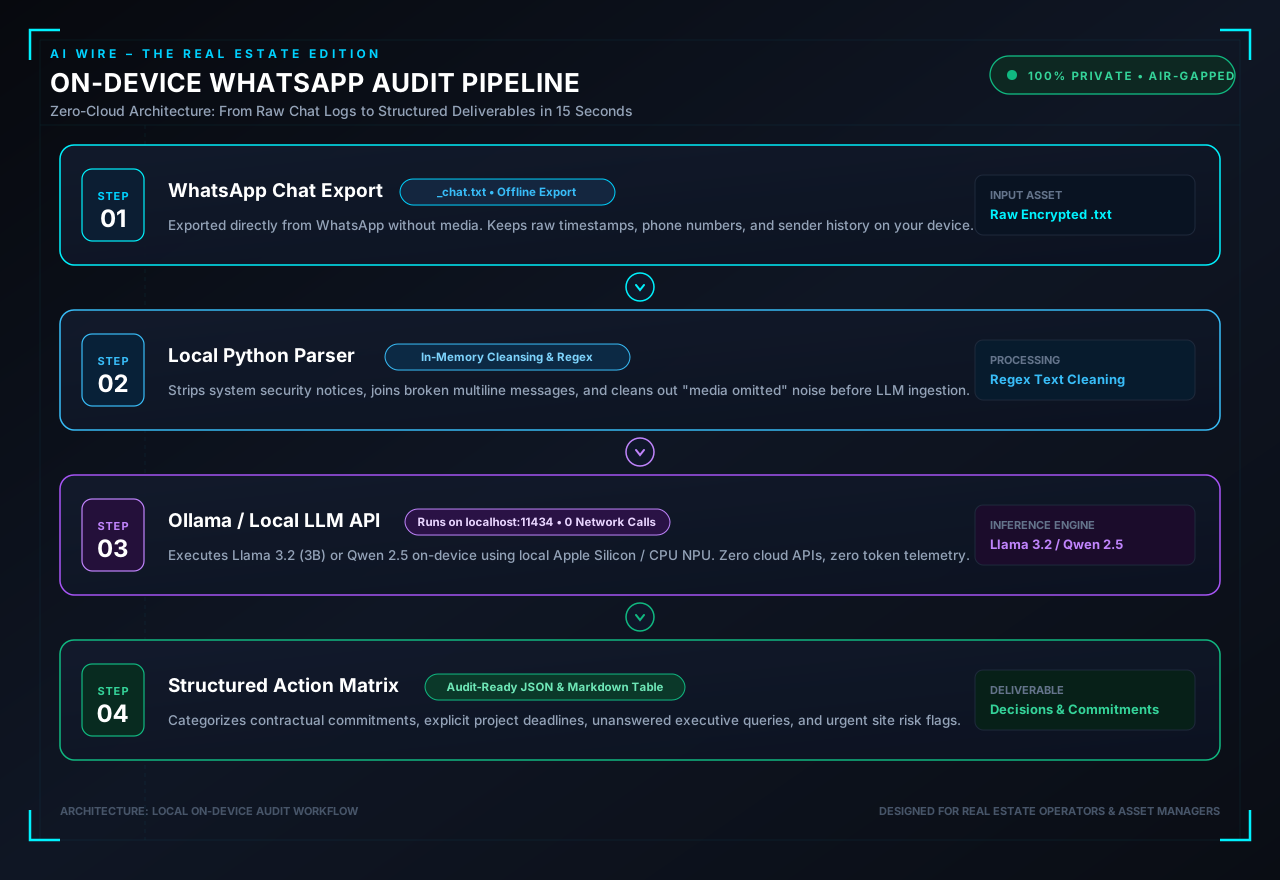
From Encrypted Chats to Actionable Briefings
How your computer pulls messages headlessly and runs local inference with zero internet exposure.
Built Natively for Your Operating System
Includes automated installers, background daemons, and step-by-step master guides for all three platforms.
macOS Launchd Background Daemon
Runs seamlessly on Apple Silicon M-series (M1/M2/M3/M4) utilizing unified memory for near-instant inference with negligible battery consumption.
- Automated Installer:
bash setup.shsets up Ollama, pulls Llama 3.2, and configures Launchd. - Sleep-Resilient: Automatically catches up and executes if your MacBook was sleeping at the scheduled time.
- Obsidian Ready: Automatically saves
audit_summary.mddirectly into your Obsidian vault.
# 1. Run automated setup script
bash setup.sh

# 2. Pairs your phone via QR code during setup

# 3. Runs automatically at 8:00 PM (or custom time)!
Windows Task Scheduler Integration
Configured natively for Windows environments with automated PowerShell task registration and batch file execution.
- One-Click Setup: Double-click
setup.batto verify Python, pull model, and register task. - Hardware Acceleration: Uses standard CPU multi-threading or Nvidia CUDA GPU acceleration.
- Wake-from-Sleep: Windows Task Scheduler awakens PC to perform the audit and returns to sleep.
REM 1. Run automated installer
setup.bat

REM 2. Pairs your phone via QR code during setup

REM 3. Runs headlessly via Task Scheduler!Systemd User Timer & Service
Designed for Linux desktop workstations and private on-premises server environments with zero cloud dependencies.
- Systemd Units: Includes production
whatsapp-audit.serviceandwhatsapp-audit.timer. - Air-Gapped Server Support: Operates entirely in user space with systemd journal logging.
- Cron / Timer Verification: Inspect execution logs anytime via
journalctl --user.
# 1. Run automated setup
bash install.sh

# 2. Pair your phone once
python3 whatsapp_sync.py --setup

# 3. Check active timer
systemctl --user list-timersThe Executive Markdown Briefing
Clean, categorized, checkable action items extracted from hundreds of unread messages.
# WhatsApp Project Audit Summary
🚨 Critical Items Needing Immediate Attention
- [HIGH] Earthwork excavator struck underground electrical conduit near Gate 2; substation power trip pending utility engineer clearance.
- [MEDIUM] Ready-mix concrete batching plant warning of 48-hour delivery delay due to transport strike.
📅 Hard Deadlines & Milestones
- ☐ Thursday 10:00 AM — Slab 4 casting joint inspection with Third-Party Quality Auditor (Owner: Structural Consultant)
- ☐ Friday 05:00 PM — Revised plumbing layout submittal for Basement 2 fire pump room (Owner: MEP Contractor)
🤝 Commitments & Action Items
- ☐ Rajesh (Facade Vendor): Send replacement physical samples for curtain wall brackets by Wednesday noon.
- ☐ Suresh (Site PM):** Issue formal change order for waterproofing screed revision in Podium Level 1.
❓ Open Questions Awaiting Decision
- Architect (Kapoor & Associates): Awaiting developer approval on whether to switch lobby glazing from 12mm toughened to double-glazed solar control DGU.
Stop Missing Critical Commitments
Get instant access to all three platform editions, complete production scripts, native schedulers, and comprehensive documentation.
WhatsApp Local Audit Toolkit
- ✓ Complete macOS, Windows & Linux script bundles
- ✓ Automated native installers & background schedulers (Launchd, Task Scheduler, Systemd)
- ✓ Headless multi-device sync engine (iPhone & Android compatible)
- ✓ Pre-configured Llama 3.2:3b prompt templates optimized for real estate
- ✓ Zero subscription fees • 100% private & on-device forever
Frequently Asked Questions
Does my phone need to be awake or on the same Wi-Fi?
No. WhatsApp uses a Multi-Device architecture. Once paired via QR code, your computer connects directly to WhatsApp servers as an independent companion device. Your phone can be in another room, locked, or on airplane mode.
Does any of my data get sent to external servers?
Zero. The scripts connect strictly to your local Ollama instance on localhost:11434. The Llama 3.2 model weights run entirely in your computer's RAM and CPU/GPU. No telemetry or chat data ever leaves your device.
Can this get my WhatsApp account banned?
No. The script uses an official linked companion device session—the exact same protocol used when you log into WhatsApp Web or the official WhatsApp Desktop application.
What are the minimum hardware requirements?
Any modern Mac (Apple Silicon M1/M2/M3/M4 or Intel i5+), Windows PC, or Linux workstation with at least 8 GB of RAM and ~3 GB of free disk space for the Llama 3.2 (3B) model.